Be better (much better): Agentic Tools and Pi

I have not written a single line of code this year. Not one. And I have shipped more than in any other year of my career — hundreds of thousands of lines changed. If that sounds reckless, good. Stay with me, because it is the opposite.
Technology has these moments where the floor moves under you. It happens in many areas, but in tech it is brutal because the old world disappears almost overnight.
The iPhone is the obvious example. Before it, phones were “good enough.” Then they became something else entirely. It changed everything. Now people can barely remember pressing the same number three times just to type a letter in an SMS.
AI is doing the same thing to us developers. Some of us know this. Not everyone sees it yet. I am very lucky to be at Shopify, where Tobi decided AI was a baseline expectation for all of us. They gave us the tools, and our culture shifted. We all wanted to go deeper into this ocean — and we did.
I still remember the first time AI autocomplete in VS Code felt real. It was magical watching it guess the next lines and accept them with Tab. Typing time dropped by at least half. That alone felt huge.
Years later, around 2020, GPT-3 came to life. Everyone was using it — not in code, not yet. But it did not take long. In the beginning of 2023, Cursor came into the game. Another change, a huge change. Now we were not just autocompleting anymore — we were planning, asking for full changes, and accepting diffs in files we had not even opened. The indexing engine, adding local semantic search for the agents, was game-changing. It reached into places we did not know about. Shopify was thriving there at that moment, with thousands of engineers testing the tooling before everyone else.
And then 2025 came, and with it Claude Code. In my personal opinion, it was one of the most important pieces of technology a software engineer could touch. It came with several annoying bumps, like asking permission for everything. But the base was there: agents that did not show you every change, removing the engineer from the code and moving them back to creativity. A new IDE was built — one that did not require you to type code, but to think about the loop, the agent, the problem, and what you wanted to get done.
YOLO (dangerously skip permissions) mode removed the last constraint we had: babysitting the agent through every file read and command. Agents are powerful. More often than not, we are the thing standing in their way. We started becoming prompt engineers.
It took several months for Claude Code to mature, and for all of us to discover what it was truly capable of. The tool was growing while, in parallel, the models were getting massively better.
And in November 2025, a new coding agent arrived: Pi (pi.dev). It fixed the things Claude Code kept tripping over, and it won me over for three reasons:
- Open source and minimal by design. Nothing hidden, nothing bloated. You see exactly what the agent is doing.
- Any model you want. Run it on whatever you can reach through an API, and switch mid-session when another one is sharper for the job.
- It extends itself. No more begging for a feature or bolting on a custom MCP. If Pi cannot do something, you build an extension — usually with Pi itself — and so does everyone else.
Here’s the honest version: if I could shape Claude Code into exactly what I wanted, I would happily stay. I can’t. Pi let me. For me, it began as a small spark at Shopify, and the whole team fell for it — shared problems getting shared fixes, out in the open, every day.
One of the most amazing tools Claude Code has is agent teams. It’s experimental, so only a few people know about it. Pi does not ship with this by default either, but that is exactly the kind of thing Pi is good at: install an extension, open another tmux pane, run another agent, and wire the agents together around tasks and messages.
That is when we started splitting work across dedicated agents, and we moved to the next wave: the loop engineers. That is the whole shift — you stop typing code and start running a loop. You frame the problem, the agents propose, you judge, you approve, you correct, you go again. A single prompt was never enough. The typing part of coding? Solved. The real job climbed up a level, into framing, reviewing, and steering that loop.
And that is what I do every single day. I learn and build with models, getting shit done, relearning everything I already know from a completely new angle. Squeezing out every bit of leverage I can.
A few things I have done at Shopify in the last 6 months:
- Cleared an outdated board with 37 tasks — reviewed them all, wrote 9 PRs, and closed what was stale. Took me 2 hours.
- Got root cause analysis on issues across massive, billion-row telemetry and log data, in minutes.
- Used autoresearch to improve one of our platforms, moving background processing time from 22 hours down to 40 minutes — it traced the bottleneck to how we were batching the work, not to the hardware. (No compute power added 😉)
- Removed 5 stale gems from our MASSIVE Gemfile.
That is my view from my own work. But this also changed how I work with teammates. I have given presentations and run multiple 1:1s helping colleagues learn and use Pi as well. My whole goal was to unblock them, and let them be better.
So back to what I said at the top: not one line of code typed by me this year. That is not a flex. It is simply the new shape of the work.
Now I want to share what you can learn and do too. Pi is not only for Shopify. There is so much being built by so many people that the best part is probably still ahead of us.
Learn what AI is first
It will help you take the leap to agentic tools if you understand what AI can do. There are plenty of resources online — try to keep pace and keep yourself up to date with everything going on.
And time-block around 2 hours and 15 minutes to watch this:
This is the best video I have seen for handing you all the context you need on everything happening right now. Understand context, the challenges, bandwidth, the science, the training. It’s fantastic!
Don’t get attached to a model
Models are launched basically every quarter. Do not get overly attached to any of them. Try new ones — they are good at solving different problems. Opus 4.6 was amazing at coding, before being nerfed (I strongly believe this) for the launch of Opus 4.7 (which was terrible). GPT 5.5 is generally great at many tasks; coding is not as good as Opus 4.6, but it is good. Fable 5 was amazing for creative work. Gemini is generally bad (sorry, it’s true). And I do not know anyone using Grok 🤣. Either way, do not get influenced by my comments — do your research, try your tools.
And yes, pay for the models, sign up for the subscriptions. It is always worth it.
Full disclosure before we go hands-on: from here on I will only talk about what I run on my personal computer. When I say GPT 5.5, I mean Codex — I drive it from my personal ChatGPT subscription, in high/xhigh thinking mode, depending on the task. I also pay for Claude Pro to run Claude Code. Use whatever model suits you. Just remember: Anthropic subscriptions only work inside Claude Code — with Pi you fall back to their API tiers, which cost a lot more.
Let’s install Pi and get some beauty around it
Here is a list of things I use in my environment:
If you’re on macOS, install Homebrew first, then the rest is just copy/paste:
# Homebrew (if you don't have it yet)
/bin/bash -c "$(curl -fsSL https://raw.githubusercontent.com/Homebrew/install/HEAD/install.sh)"

# Ghostty and tmux
brew install --cask ghostty
brew install tmux

# Pi
curl -fsSL https://pi.dev/install.sh | sh
You can copy and install some of my settings. Just paste these locally:
tmux:
curl -fsSL https://raw.githubusercontent.com/dantetekanem/leo-personal-pi/main/configs/tmux.conf -o ~/.tmux.conf
tmux source-file ~/.tmux.conf 2>/dev/null || true
ghostty:
mkdir -p ~/.config/ghostty
for f in config.ghostty local.ghostty new-tmux-session; do
  curl -fsSL "https://raw.githubusercontent.com/dantetekanem/leo-personal-pi/main/configs/ghostty/$f" \
    -o "$HOME/.config/ghostty/$f"
done
# point Ghostty at my config (back up any existing one first)
[ -f ~/.config/ghostty/config ] && mv ~/.config/ghostty/config ~/.config/ghostty/config.bak
ln -sf ~/.config/ghostty/config.ghostty ~/.config/ghostty/config
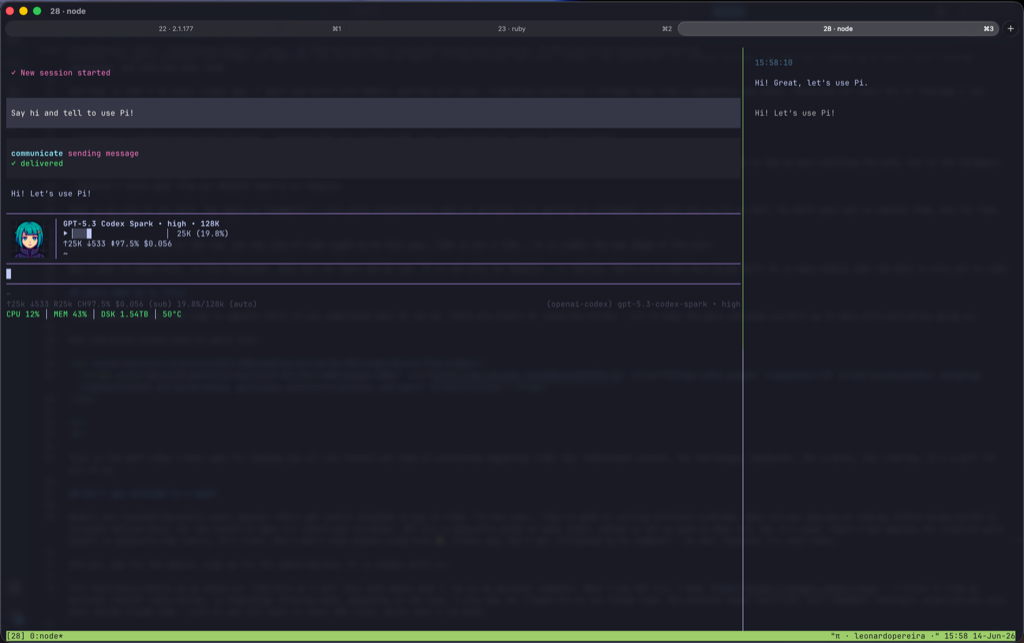
And this is how my interface looks like:
Your first five minutes inside Pi
Pi drops you into a real tool, not a tutorial. This is one place where pi.dev still needs more docs, so here is the path I give people the first time they open it.
Open a folder you can safely experiment in and run pi. Before you ask it to touch real work, do the boring setup:
- Run
/login. Authenticate first, otherwise every serious prompt is going to turn into an auth detour. - Run
/settings. Not because you need to understand everything yet, but because you should see the shape of the tool: providers, permissions, extensions, commands, the knobs you can actually turn. - Run
/modeland pick the model you want to start with. Do not treat this as permanent. Treat it like choosing a lens for the next job. - Set the thinking level. Use
highorxhighwhen the task needs judgment, design, research, or a scary diff. Use lighter thinking when you are doing something mechanical. - Learn the shortcut:
Shift+Tabcycles thinking while you are composing. It sounds tiny. It is not. You will change thinking levels all the time once you get used to matching the model’s effort to the work. - Run one harmless prompt before you point it at production code:
Read this folder and tell me what kind of project this is.
Do not edit files. Give me a short map of the important files and the first risks you see.
That little prompt teaches you the loop. Ask, inspect, correct, ask again. The first win with Pi should not be a giant diff. It should be trust. You want to learn how it reads, how it asks for permission, how it reports uncertainty, how it uses your tools. Once that feels boring, you are ready to give it real work.
Take bigger challenges and do the hardest work possible
Do not use your agents only for simple things like “make ticket xyz done” or “write a function to persist idempotent requests in logs.” No. Ask for the bigger outcome: “rewrite the outputs and logs in this project so every request shares the same idempotency key and is tracked correctly in our third-party tools, Grafana, and Prometheus.”
Push the agent to reach higher. It will fail today, and that failure is where you start hardening your setup and growing the harness around it. Hardening and harness — those two words are everywhere right now, and for good reason.
You need to learn how to make plans. I love agents that keep TODO lists — they follow a plan and keep it consistent. Organize skills so they know how to do specialized work, like a Rails Engineer, React Engineer, Test Engineer, Security Specialist, and much more.
Give power and tools to your agents so they can reach further. Web access, data knowledge, how to read logs, how to build dashboards — all of that. Have MCPs or local extensions to find data as they need it. Read-only access to a database for small projects, BigQuery access for big ones. Slack access for history across different channels. Let it know it all.
Install a memory system so the agent can learn as it goes and carry that knowledge into the next session. If something is missing, use Pi itself to build an extension to solve it.
Multiply your agents, and learn to orchestrate
Like I said, Claude Code had agent teams in experimental for a while. It’s a very expensive feature — it lets you spawn new agents running in parallel. So instead of 1 expensive agent, you have 5 or 10. Pi does not have this by default either, but you can easily install a package to do it. I personally use pi-extended-teams for this. You will also need tmux for it.
When I say spawn agents, I mean creating separate agent sessions, usually in separate tmux panes, each with its own context window and one narrow job. One agent reads docs. One traces the code. One writes tests. One reviews the final diff. They report back to a lead agent, or directly to you.
This is not “let ten bots freestyle on my repo.” Please don’t do that. That is how you get expensive chaos.
Spawning agents only works when you give each one a lane:
- What exactly should this agent do?
- What files, docs, logs, or tools should it inspect?
- Can it edit, or is it read-only?
- What does done look like?
- Where should it report the result?
Also, build a skill that puts a leader agent in charge of the work. Its only concern is orchestrating and delegating. For a genuinely hard task, the leader can send narrow research, testing, security, and review work to different agents, then make the final call with all the evidence collected.
The thinking behind this loop is all about the context window. If you watched the video I shared (and you should), you now know more about how important context is for the agent and its thinking process. If a hard task can accumulate almost 1 million tokens in one session, it will be impossible to get it done cleanly. By spawning agents to research online, collect data, prove things out, and analyze the best places in the code, your main agent stays below 100k and you still have everything you need.
Agents are extremely powerful by nature, and you should let that nature run in narrow lanes, not jam everything into one giant conversation. This divide-and-conquer move lets you multiply yourself and crack the hardest challenges with more control, not less.
Let’s get concrete. Say you want to build a new SaaS that helps people find jobs. What will you need? Many things. But for this simple exercise, here’s what I would do with many agents:
- An initial prompt explaining my project in detail, centered on the goal of what I want done.
- Research the framework and project design, thinking at the database level from the start.
- Find website references, strong design trends, and the best way to present information for my use case — mobile-friendly and easy for the average user.
- Dig up the best sources to crawl job positions and surface new opportunities.
- Write the prompts the product itself will use to reuse models for its in-app intelligence.
- Compare hosting options that stay cheap and still support the stack I need.
- Lean on TDD so the agents produce solid code, not a “vibe-coded” mess.
- Study marketing and costs to land on the right pricing.
- On pricing, research the best integrations to charge customers, and how permissions should work.
This is the first wave of agents. It can get the SaaS into a good alpha version shockingly fast. The second wave comes when you learn the gaps, and what else you need:
- Authentication
- Security
- UX/UI
- Functionalities
- Limitations
This is a loop you’ll be in. You will not touch the code anymore — but you will review every line of it. I built tooling for exactly this, and I’ll show it to you in the last section.
Design skills to get more done
Skills are where the agent stops being a generalist and becomes your specialist. Be creative — picture the exact engineer you wish you could clone, then write them down. Here are the ones I lean on every day, but the real payoff is building your own:
- rails-engineer — focused Rails work, the way I’d want it written.
- rails-testing-engineer — Minitest specialist that writes real specs, not coverage theater.
- javascript-engineer — idiomatic, clean JavaScript work.
- react-engineer — React components and frontend structure.
- frontend-animator — the fun one, for motion and polish on the UI.
- test-expert — TDD discipline across the board.
- quality-expert — keeps the code clean and the smells out.
- refactor-expert — restructures without changing behavior.
- security-expert — reviews and hardens with a security lens.
- code-expert — deep code analysis when I need the details.
- pre-launch-expert — the last check before anything ships.
- team-leader — the orchestrator, controls and delegates to the other agents.
- task-manager — keeps the Plan and the TODO lists consistent.
- autoresearch-candidates — finds the best places in the code to dig into.
- brainstorming — when I want to think out loud and explore options.
Use extensions
Build your own extensions to mold the agent around your work. Think of it like modeling clay — we’re not hardcoding anymore, we’re shaping what an agent can do and pressing it into the exact form your work needs. You should do the same.
First, head to pi.dev/packages and start looking at what you like. There are over 3,900 packages there, and you can start using most of them right away.
A few I built myself and run daily:
- pi-agentic-search — make the agent search with intent, not just wander around.
- pi-render-images-tmux — render images right inside tmux (yes, that avatar up there).
- pi-feedback — a tighter feedback loop with the agent.
- pi-coder — a code workbench and cleaner diffs for reviewing exactly what the agent changed.
- pi-persona — give the agent a custom persona.
- ada — an artifact-driven agent.
- pi-thinking-messaging — adds elapsed time and token count to Pi’s working/thinking loader.
And third-party ones I keep switched on:
- pi-autoresearch — the autoresearch I keep bringing up. This one is gold.
- pi-hermes-memory — token-aware persistent memory. This is the memory system I mentioned earlier.
- pi-ghostty — Ghostty integration for the setup above.
- pi-ask-user — interactive selection prompts when the agent needs a call from me.
- pi-code-previews — inline previews of the code being touched.
- @ifi/oh-pi-themes — themes, because the beauty matters.
- napkin-ai — quick visuals and diagrams from a prompt.
- pi-emote — a bit of personality in the loop.
If an existing extension does not do everything you want, you can and should clone it and modify it to fit your work. Pi is extremely good at this.
Let’s actually run one. Hands-on with Pi.
Enough theory. Open a small project you understand. Not the scariest monolith yet. The goal is to feel the loop, not to prove you are brave.
Start read-only:
You are helping me understand this project.
Do not edit files.
Read the README, package files, and source layout.
Give me:
1. what this app does
2. the most important files
3. the first risks you see
4. one small improvement candidate
That prompt is boring on purpose. You are teaching yourself how the agent reads, how it reports uncertainty, and whether it can separate evidence from guessing.
Now make it plan:
I want one small improvement that can be done safely in under 30 minutes.
Find 3 candidates.
For each one, explain the user impact, files likely involved, risks, and how you would verify it.
Do not edit yet.
Pick one, then force the agent to work like an engineer:
Implement option 2.
Before editing, write a short plan with the files you expect to touch.
Keep the diff small.
Add or update tests if this project has a test suite.
Stop and ask if you need a product decision.
After it says it is done, do not celebrate yet. Review it:
Show me the diff as a reviewer.
Explain why each file changed.
List the highest-risk assumption in this implementation.
Tell me exactly what test or command proves this works.
Then run the verification. If it fails, great. That is not embarrassment; that is the loop working. Make the agent debug the failure with evidence, not vibes.
This is the shape:
- Ask it to understand.
- Ask it to plan.
- Let it make the smallest useful change.
- Review the diff.
- Verify the behavior.
- Feed the result back into the next loop.
Once this feels boring, scale it. Add skills. Add extensions. Add memory. Add teams. Give the agents better tools. But keep the judgment with you.
Do not accept everything. Review it all
Read my blog post on Code Reviews Matter a Freaking Lot. I mean it. If you take one thing from this post, take that: AI makes code review more important, not less.
This is the part I do not want to blur: you are still responsible.
Even if you typed zero lines, you approved the shape of the change. If it breaks later, the useful question is not “which model wrote it?” It is “what did we miss in review?” That mindset matters.
Before AI, a review protected you from another person’s blind spot. Now it also protects you from output that can look complete before it is truly understood. The dangerous code is not always ugly. Sometimes it has green tests, clean names, and one missing idempotency key nobody noticed.
That is why I care so much about the review loop. pi-coder shows me exactly what the agent touched. pi-feedback lets me hand correction back without turning the whole session into noise. I do not need more narration from the agent. I need a clear diff, a precise correction path, and a loop that lets me step in when judgment matters.
For me, Pi is not permission to care less. It is a way to move the care to a better place. Less hunting for files. More asking whether this belongs in the system. Less “please write this method.” More “prove this is the right design, with data, docs, tests, and the smallest safe diff.”
And yes, some days are messy. Agents get stuck. They invent things with confidence. Context drifts. Tools break. API costs can surprise you. When that happens, slow down. Read the code. Think. The loop is supposed to serve your judgment, not replace it.
That is the whole point of this post, really. Be faster, yes. Ship more, yes. But stay close to the decisions that matter. Build the harness. Run the loop. Demand evidence. Review the result. Own it.
That is how I work now. If any of this resonates, or if you think I am dead wrong, find me at me@leonardopereira.com. Now go be better — much better.
Eu não escrevi uma única linha de código este ano. Nenhuma. E entreguei mais do que em qualquer outro ano da minha carreira — centenas de milhares de linhas alteradas. Se isso soa irresponsável, ótimo. Fique comigo, porque é exatamente o oposto.
Tecnologia tem esses momentos em que o chão se move debaixo de você. Isso acontece em muitas áreas, mas em tecnologia é brutal porque o mundo antigo desaparece quase da noite para o dia.
O iPhone é o exemplo óbvio. Antes dele, celulares eram “bons o suficiente.” Então viraram outra coisa completamente diferente. Ele mudou tudo. Hoje as pessoas mal conseguem lembrar de apertar o mesmo número três vezes só para digitar uma letra em um SMS.
AI está fazendo a mesma coisa conosco, desenvolvedores. Alguns de nós sabem disso. Nem todo mundo enxerga ainda. Tenho muita sorte de estar na Shopify, onde Tobi decidiu que AI era uma expectativa básica para todos nós. Eles nos deram as ferramentas, e nossa cultura mudou. Todos queríamos mergulhar mais fundo nesse oceano — e mergulhamos.
Ainda lembro da primeira vez que autocomplete com AI no VS Code pareceu real. Era mágico ver aquilo adivinhar as próximas linhas e aceitar com Tab. O tempo digitando caiu pelo menos pela metade. Só isso já parecia enorme.
Anos depois, por volta de 2020, o GPT-3 ganhou vida. Todo mundo estava usando — não em código, ainda não. Mas não demorou. No começo de 2023, o Cursor entrou no jogo. Outra mudança, uma mudança enorme. Agora não estávamos mais apenas autocompletando — estávamos planejando, pedindo mudanças completas e aceitando diffs em arquivos que nem tínhamos aberto. O motor de indexação, adicionando busca semântica local para os agentes, mudou o jogo. Ele alcançava lugares que nem sabíamos que existiam. A Shopify estava prosperando ali naquele momento, com milhares de engenheiros testando a ferramenta antes de todo mundo.
Então veio 2025, e com ele o Claude Code. Na minha opinião pessoal, foi uma das peças de tecnologia mais importantes que um engenheiro de software poderia tocar. Ele veio com vários tropeços irritantes, como pedir permissão para tudo. Mas a base estava ali: agentes que não mostravam cada mudança, removendo o engenheiro do código e levando-o de volta à criatividade. Uma nova IDE foi construída — uma que não exigia que você digitasse código, mas que pensasse sobre o loop, o agente, o problema e o que você queria fazer.
O modo YOLO (pular permissões perigosamente) removeu a última restrição que tínhamos: ficar de babá do agente em cada leitura de arquivo e comando. Agentes são poderosos. Na maioria das vezes, nós somos aquilo que fica no caminho deles. Começamos a nos tornar prompt engineers.
Levou vários meses para o Claude Code amadurecer e para todos nós descobrirmos do que ele era realmente capaz. A ferramenta estava crescendo enquanto, em paralelo, os modelos ficavam massivamente melhores.
E em novembro de 2025 chegou um novo agente de código: Pi (pi.dev). Ele corrigiu as coisas nas quais o Claude Code continuava tropeçando, e me conquistou por três motivos:
- Open source e minimalista por design. Nada escondido, nada inchado. Você vê exatamente o que o agente está fazendo.
- Qualquer modelo que você quiser. Rode no que conseguir alcançar por uma API e troque no meio da sessão quando outro estiver mais afiado para o trabalho.
- Ele estende a si mesmo. Chega de implorar por uma feature ou encaixar um MCP customizado. Se o Pi não consegue fazer algo, você constrói uma extensão — geralmente com o próprio Pi — e todo mundo também faz isso.
Aqui está a versão honesta: se eu pudesse moldar o Claude Code exatamente como eu queria, ficaria feliz em continuar. Não posso. O Pi deixou. Para mim, ele começou como uma pequena faísca na Shopify, e o time inteiro se apaixonou por ele — problemas compartilhados recebendo correções compartilhadas, em aberto, todos os dias.
Uma das ferramentas mais incríveis que o Claude Code tem é agent teams. É experimental, então poucas pessoas sabem. O Pi também não vem com isso por padrão, mas esse é exatamente o tipo de coisa em que o Pi é bom: instale uma extensão, abra outro pane no tmux, rode outro agente e conecte os agentes ao redor de tarefas e mensagens.
Foi aí que começamos a dividir trabalho entre agentes dedicados, e avançamos para a próxima onda: os loop engineers. Essa é a grande mudança — você para de digitar código e começa a rodar um loop. Você enquadra o problema, os agentes propõem, você julga, aprova, corrige, vai de novo. Um único prompt nunca foi suficiente. A parte de digitar código? Resolvida. O trabalho real subiu um nível, para enquadrar, revisar e guiar esse loop.
E é isso que eu faço todos os dias. Aprendo e construo com modelos, fazendo a coisa acontecer, reaprendendo tudo que eu já sabia por um ângulo completamente novo. Extraindo cada gota de alavancagem que consigo.
Algumas coisas que fiz na Shopify nos últimos 6 meses:
- Limpei um board antigo com 37 tarefas — revisei todas, escrevi 9 PRs e fechei o que estava obsoleto. Levei 2 horas.
- Fiz análise de causa raiz em problemas atravessando telemetria e logs massivos, com bilhões de linhas, em minutos.
- Usei autoresearch para melhorar uma das nossas plataformas, reduzindo o tempo de processamento em background de 22 horas para 40 minutos — ele rastreou o gargalo até a forma como estávamos agrupando o trabalho, não até o hardware. (Sem adicionar poder computacional 😉)
- Removi 5 gems obsoletas do nosso Gemfile MASSIVO na Shopify.
Essa é minha visão a partir do meu próprio trabalho. Mas isso também mudou como trabalho com meus colegas. Dei apresentações e fiz vários 1:1s ajudando colegas a aprenderem e usarem Pi também. Meu objetivo inteiro era desbloqueá-los e permitir que fossem melhores.
Então, voltando ao que eu disse no começo: nem uma linha de código digitada por mim este ano. Isso não é uma ostentação. É simplesmente o novo formato do trabalho.
Agora quero compartilhar o que você também pode aprender e fazer. Pi não é apenas para a Shopify. Há tanto sendo construído por tanta gente que a melhor parte provavelmente ainda está por vir.
Primeiro aprenda o que é AI
Vai ajudar você a dar o salto para Agentic Tools se entender o que AI consegue fazer. Existem muitos recursos online — tente acompanhar o ritmo e se manter atualizado com tudo que está acontecendo.
E reserve cerca de 2h15 para assistir a isto:
Este é o melhor vídeo que já vi para entregar todo o contexto necessário sobre tudo que está acontecendo agora. Entenda contexto, desafios, largura de banda, ciência, treinamento. É um presente para todos nós.
Não se apegue a um modelo
Modelos são lançados basicamente todo trimestre. Não se apegue demais a nenhum deles. Experimente novos — eles são bons em resolver problemas diferentes. Opus 4.6 era incrível para código, antes de ser nerfado (eu acredito muito nisso) para o lançamento do Opus 4.7 (que foi terrível). GPT 5.5 é geralmente ótimo em muitas tarefas; para código não é tão bom quanto Opus 4.6, mas é bom. Fable 5 foi incrível para trabalho criativo. Gemini é geralmente ruim (desculpa, é verdade). E não conheço ninguém usando Grok 🤣. De qualquer forma, não se deixe influenciar pelos meus comentários — faça sua pesquisa, experimente suas ferramentas.
E sim, pague pelos modelos, assine as subscriptions. Sempre vale a pena.
Transparência total antes de irmos para a prática: daqui em diante vou falar apenas sobre o que rodo no meu computador pessoal. Quando digo GPT 5.5, quero dizer Codex — eu uso a partir da minha assinatura pessoal do ChatGPT, em modo high/xhigh thinking, dependendo da tarefa. Também pago Claude Pro para rodar Claude Code. Use o modelo que servir melhor para você. Só lembre: assinaturas da Anthropic só funcionam dentro do Claude Code — com Pi você cai nos tiers de API deles, que custam muito mais.
Vamos instalar o Pi e deixar tudo bonito em volta
Aqui está uma lista de coisas que uso no meu ambiente:
Se você está no macOS, instale o Homebrew primeiro; depois, o resto é só copiar e colar:
# Homebrew (if you don't have it yet)
/bin/bash -c "$(curl -fsSL https://raw.githubusercontent.com/Homebrew/install/HEAD/install.sh)"

# Ghostty and tmux
brew install --cask ghostty
brew install tmux

# Pi
curl -fsSL https://pi.dev/install.sh | sh
Você pode copiar e instalar algumas das minhas configurações. Basta colar isto localmente:
tmux:
curl -fsSL https://raw.githubusercontent.com/dantetekanem/leo-personal-pi/main/configs/tmux.conf -o ~/.tmux.conf
tmux source-file ~/.tmux.conf 2>/dev/null || true
ghostty:
mkdir -p ~/.config/ghostty
for f in config.ghostty local.ghostty new-tmux-session; do
  curl -fsSL "https://raw.githubusercontent.com/dantetekanem/leo-personal-pi/main/configs/ghostty/$f" \
    -o "$HOME/.config/ghostty/$f"
done
# point Ghostty at my config (back up any existing one first)
[ -f ~/.config/ghostty/config ] && mv ~/.config/ghostty/config ~/.config/ghostty/config.bak
ln -sf ~/.config/ghostty/config.ghostty ~/.config/ghostty/config
E é assim que minha interface se parece:
Seus primeiros cinco minutos dentro do Pi
O Pi joga você dentro de uma ferramenta real, não de um tutorial. Este é um lugar em que pi.dev ainda precisa de mais docs, então aqui está o caminho que dou para as pessoas na primeira vez que elas abrem.
Abra uma pasta em que você possa experimentar com segurança e rode pi. Antes de pedir para ele tocar em trabalho real, faça o setup chato:
- Rode
/login. Autentique primeiro, senão todo prompt sério vai virar um desvio de autenticação. - Rode
/settings. Não porque você precisa entender tudo ainda, mas porque deve ver o formato da ferramenta: providers, permissões, extensões, comandos, os knobs que você realmente pode girar. - Rode
/modele escolha o modelo com que quer começar. Não trate isso como permanente. Trate como escolher uma lente para o próximo trabalho. - Defina o nível de thinking. Use
highouxhighquando a tarefa precisar de julgamento, design, pesquisa ou um diff assustador. Use thinking mais leve quando estiver fazendo algo mecânico. - Aprenda o atalho:
Shift+Tabalterna o thinking enquanto você está escrevendo. Parece pequeno. Não é. Você vai mudar os níveis de thinking o tempo todo quando se acostumar a combinar o esforço do modelo com o trabalho. - Rode um prompt inofensivo antes de apontar para código de produção:
Read this folder and tell me what kind of project this is.
Do not edit files. Give me a short map of the important files and the first risks you see.
Esse prompt pequeno ensina o loop. Pergunte, inspecione, corrija, pergunte de novo. A primeira vitória com Pi não deveria ser um diff gigante. Deveria ser confiança. Você quer aprender como ele lê, como pede permissão, como reporta incerteza, como usa suas ferramentas. Quando isso ficar entediante, você estará pronto para dar trabalho real.
Pegue desafios maiores e faça o trabalho mais difícil possível
Não use seus agentes apenas para coisas simples como “terminar o ticket xyz” ou “escrever uma função para persistir requests idempotentes em logs.” Não. Peça o resultado maior: “reescreva as saídas e logs deste projeto para que cada request compartilhe a mesma idempotency key e seja rastreado corretamente nas nossas ferramentas de terceiros, Grafana e Prometheus.”
Empurre o agente para ir mais alto. Ele vai falhar hoje, e essa falha é onde você começa a endurecer seu setup e a criar o harness ao redor dele. Hardening e harness — essas duas palavras estão em todo lugar agora, e por um bom motivo.
Você precisa aprender a fazer planos. Eu amo agentes que mantêm TODO lists — eles seguem um plano e o mantêm consistente. Organize skills para que eles saibam fazer trabalho especializado, como um Rails Engineer, React Engineer, Test Engineer, Security Specialist e muito mais.
Dê poder e ferramentas aos seus agentes para que possam ir mais longe. Acesso à web, conhecimento de dados, como ler logs, como construir dashboards — tudo isso. Tenha MCPs ou extensões locais para encontrar dados conforme necessário. Acesso read-only a um banco de dados para projetos pequenos, acesso ao BigQuery para grandes. Acesso ao Slack para histórico em diferentes canais. Deixe-o saber tudo.
Instale um sistema de memória para que o agente aprenda enquanto trabalha e leve esse conhecimento para a próxima sessão. Se algo estiver faltando, use o próprio Pi para construir uma extensão que resolva.
Multiplique seus agentes e aprenda a orquestrar
Como eu disse, Claude Code teve agent teams em experimental por um tempo. É uma feature muito cara — ela permite spawnar novos agentes rodando em paralelo. Então, em vez de 1 agente caro, você tem 5 ou 10. Pi também não tem isso por padrão, mas você pode instalar facilmente um pacote para fazer isso. Eu pessoalmente uso pi-extended-teams para isso. Você também vai precisar de tmux.
Quando eu digo spawnar agentes, quero dizer criar sessões de agentes separadas, geralmente em panes separados do tmux, cada uma com sua própria janela de contexto e um trabalho estreito. Um agente lê docs. Um rastreia o código. Um escreve testes. Um revisa o diff final. Eles reportam de volta para um agente líder, ou diretamente para você.
Isso não é “soltar dez bots para improvisar no meu repo.” Por favor, não faça isso. É assim que você ganha caos caro.
Spawnar agentes só funciona quando você dá uma trilha para cada um:
- O que exatamente este agente deve fazer?
- Quais arquivos, docs, logs ou ferramentas ele deve inspecionar?
- Ele pode editar, ou é read-only?
- Como é o trabalho pronto?
- Onde ele deve reportar o resultado?
Além disso, construa uma skill que coloque um agente líder no comando do trabalho. A única preocupação dele é orquestrar e delegar. Para uma tarefa genuinamente difícil, o líder pode enviar pesquisa, testes, segurança e revisão para agentes diferentes, e então tomar a decisão final com toda a evidência coletada.
A lógica por trás desse loop tem tudo a ver com a janela de contexto. Se você assistiu ao vídeo que compartilhei (e deveria), agora sabe mais sobre a importância do contexto para o agente e para o processo de pensamento dele. Se uma tarefa difícil pode acumular quase 1 milhão de tokens em uma sessão, será impossível terminá-la de forma limpa. Ao spawnar agentes para pesquisar online, coletar dados, provar coisas e analisar os melhores lugares no código, seu agente principal fica abaixo de 100k e você ainda tem tudo que precisa.
Agentes são extremamente poderosos por natureza, e você deve deixar essa natureza correr em trilhas estreitas, não enfiar tudo em uma conversa gigante. Esse movimento de dividir para conquistar permite que você se multiplique e quebre os desafios mais difíceis com mais controle, não menos.
Vamos tornar isso concreto. Digamos que você queira construir um novo SaaS que ajude pessoas a encontrar empregos. O que você vai precisar? Muitas coisas. Mas, para este exercício simples, eu faria isto com muitos agentes:
- Um prompt inicial explicando meu projeto em detalhes, centrado no objetivo do que quero fazer.
- Pesquisar o framework e o design do projeto, pensando no nível de banco de dados desde o começo.
- Encontrar referências de sites, tendências fortes de design e a melhor forma de apresentar informação para meu caso de uso — mobile-friendly e fácil para o usuário médio.
- Descobrir as melhores fontes para crawlear vagas e trazer novas oportunidades.
- Escrever os prompts que o próprio produto vai usar para reutilizar modelos na inteligência dentro do app.
- Comparar opções de hospedagem que continuem baratas e ainda suportem a stack que preciso.
- Apoiar-se em TDD para que os agentes produzam código sólido, não uma bagunça “vibe-coded”.
- Estudar marketing e custos para chegar ao preço certo.
- Em pricing, pesquisar as melhores integrações para cobrar clientes e como permissões deveriam funcionar.
Essa é a primeira onda de agentes. Ela pode levar o SaaS a uma boa versão alpha assustadoramente rápido. A segunda onda vem quando você aprende as lacunas e o que mais precisa:
- Autenticação
- Segurança
- UX/UI
- Funcionalidades
- Limitações
Esse é um loop em que você estará. Você não vai mais tocar no código — mas vai revisar cada linha dele. Eu construí ferramentas exatamente para isso, e vou mostrar na última seção.
Desenhe skills para fazer mais
Skills são onde o agente deixa de ser generalista e vira o seu especialista. Seja criativo — imagine o engenheiro exato que você gostaria de clonar, e então escreva isso. Aqui estão os que eu uso todos os dias, mas o ganho real está em criar os seus próprios:
- rails-engineer — focado em Rails, do jeito que eu gostaria que fosse escrito.
- rails-testing-engineer — especialista em Minitest que escreve specs reais, não teatro de cobertura.
- javascript-engineer — trabalho JavaScript idiomático e limpo.
- react-engineer — componentes React e estrutura frontend.
- frontend-animator — o divertido, para motion e polimento na UI.
- test-expert — disciplina de TDD em todos os lugares.
- quality-expert — mantém o clean code e os smells fora.
- refactor-expert — reestrutura sem mudar comportamento.
- security-expert — revisa e fortalece com uma lente de segurança.
- code-expert — análise profunda de código quando preciso dos detalhes.
- pre-launch-expert — a última checagem antes de qualquer coisa ir ao ar.
- team-leader — o orquestrador, controla e delega para os outros agentes.
- task-manager — mantém o Plano e as TODO lists consistentes.
- autoresearch-candidates — encontra os melhores lugares no código para investigar.
- brainstorming — quando quero pensar em voz alta e explorar opções.
Use extensões
Construa suas próprias extensões para moldar o agente ao redor do seu trabalho. Pense nisso como modelar argila — não estamos mais hardcodando, estamos moldando o que um agente consegue fazer e pressionando isso exatamente na forma que seu trabalho exige. Você deveria fazer o mesmo.
Primeiro, vá para pi.dev/packages e comece a olhar o que gosta. Existem mais de 3.900 pacotes por lá, e você pode começar a usar a maioria imediatamente.
Alguns que eu mesmo construí e rodo todos os dias:
- pi-agentic-search — faz o agente buscar com intenção, não apenas vagar por aí.
- pi-render-images-tmux — renderiza imagens direto no tmux (sim, aquele avatar ali em cima).
- pi-feedback — um feedback loop mais apertado com o agente.
- pi-coder — uma bancada de código e diffs mais limpos para revisar exatamente o que o agente mudou.
- pi-persona — dá ao agente uma persona customizada.
- ada — um agente orientado por artefatos.
- pi-thinking-messaging — adiciona tempo decorrido e contagem de tokens ao loader de working/thinking do Pi.
E extensões de terceiros que mantenho ligadas:
- pi-autoresearch — o autoresearch que continuo mencionando. Esse é ouro.
- pi-hermes-memory — memória persistente consciente de tokens. Esse é o sistema de memória que mencionei antes.
- pi-ghostty — integração com Ghostty para o setup acima.
- pi-ask-user — prompts interativos de seleção quando o agente precisa de uma decisão minha.
- pi-code-previews — previews inline do código sendo alterado.
- @ifi/oh-pi-themes — temas, porque a beleza importa.
- napkin-ai — visuais e diagramas rápidos a partir de um prompt.
- pi-emote — um pouco de personalidade no loop.
Se uma extensão existente não faz tudo que você quer, você pode e deve cloná-la e modificá-la para encaixar no seu trabalho. Pi é extremamente bom nisso.
Vamos realmente rodar uma. Hands-on com Pi.
Chega de teoria. Abra um projeto pequeno que você entende. Ainda não o monolito mais assustador. O objetivo é sentir o loop, não provar que você é corajoso.
Comece read-only:
You are helping me understand this project.
Do not edit files.
Read the README, package files, and source layout.
Give me:
1. what this app does
2. the most important files
3. the first risks you see
4. one small improvement candidate
Esse prompt é chato de propósito. Você está ensinando a si mesmo como o agente lê, como reporta incerteza e se ele consegue separar evidência de chute.
Agora faça ele planejar:
I want one small improvement that can be done safely in under 30 minutes.
Find 3 candidates.
For each one, explain the user impact, files likely involved, risks, and how you would verify it.
Do not edit yet.
Escolha uma opção, então force o agente a trabalhar como engenheiro:
Implement option 2.
Before editing, write a short plan with the files you expect to touch.
Keep the diff small.
Add or update tests if this project has a test suite.
Stop and ask if you need a product decision.
Depois que ele disser que terminou, não comemore ainda. Revise:
Show me the diff as a reviewer.
Explain why each file changed.
List the highest-risk assumption in this implementation.
Tell me exactly what test or command proves this works.
Então rode a verificação. Se falhar, ótimo. Isso não é vergonha; é o loop funcionando. Faça o agente depurar a falha com evidência, não vibes.
Este é o formato:
- Peça para ele entender.
- Peça para ele planejar.
- Deixe ele fazer a menor mudança útil.
- Revise o diff.
- Verifique o comportamento.
- Alimente o resultado de volta no próximo loop.
Quando isso ficar entediante, escale. Adicione skills. Adicione extensões. Adicione memória. Adicione times. Dê ferramentas melhores aos agentes. Mas mantenha o julgamento com você.
Não aceite tudo. Revise tudo
Leia meu post Code Reviews Matter a Freaking Lot. Estou falando sério. Se você tirar uma coisa deste post, tire esta: AI torna code review mais importante, não menos.
Esta é a parte que eu não quero borrar: você ainda é responsável.
Mesmo que você tenha digitado zero linhas, você aprovou o formato da mudança. Se quebrar depois, a pergunta útil não é “qual modelo escreveu isso?” É “o que deixamos passar na review?” Essa mentalidade importa.
Antes de AI, uma review protegia você do ponto cego de outra pessoa. Agora ela também protege você de um output que pode parecer completo antes de ser realmente entendido. O código perigoso nem sempre é feio. Às vezes ele tem testes verdes, nomes limpos e uma idempotency key faltando que ninguém percebeu.
É por isso que eu me importo tanto com o loop de review. pi-coder me mostra exatamente o que o agente tocou. pi-feedback me permite devolver correção sem transformar a sessão inteira em ruído. Eu não preciso de mais narração do agente. Eu preciso de um diff claro, um caminho preciso de correção e um loop que me deixe entrar quando julgamento importa.
Para mim, Pi não é permissão para se importar menos. É uma forma de mover o cuidado para um lugar melhor. Menos caçar arquivos. Mais perguntar se isso pertence ao sistema. Menos “por favor escreva este método.” Mais “prove que este é o design certo, com dados, docs, testes e o menor diff seguro.”
E sim, alguns dias são bagunçados. Agentes travam. Eles inventam coisas com confiança. O contexto deriva. Ferramentas quebram. Custos de API podem surpreender. Quando isso acontecer, desacelere. Leia o código. Pense. O loop deve servir ao seu julgamento, não substituí-lo.
Esse é o ponto inteiro deste post, de verdade. Seja mais rápido, sim. Entregue mais, sim. Mas fique perto das decisões que importam. Construa o harness. Rode o loop. Exija evidência. Revise o resultado. Seja dono.
É assim que eu trabalho agora. Se algo disso ressoou, ou se você acha que estou completamente errado, me encontre em me@leonardopereira.com. Agora vá ser melhor — muito melhor.