The Human in the Loop

Agentic tooling is everywhere. Across several companies, one engineer can now spawn more than 100 agents in a normal day. Research, coding, automation, scheduled tasks, reviews, and more.
Agents can do a lot, but they cannot do everything (yet). Definitely not everything.
How many agents you run depends on the task. One investigation? A frontier model can probably handle it alone if it has the context it needs. Does the task require more information? It can spawn agents to collect it from different sources. A complex implementation might use several writer agents updating independent parts at the same time. A larger orchestration can have one frontier agent delegating an entire graph of work.
The scope can grow quickly. Keeping context under control is always important.
That is the agent’s internal loop, which I will explore in another post. This one is about the part we cannot delegate away: the human in the loop.
The Loop
When you use advanced coding agents with permission checks bypassed, such as Pi, Claude Code, or Codex, the workflow often looks simple: provide one prompt and wait for the result.
Sometimes it really is that simple. So let’s imagine a real enterprise task.
You have a monolith whose main product is URL shortening. It has been around for decades and handles serious traffic. An engineer receives an apparently small task: track one additional telemetry signal for repeated requests from the same address. This is the first step toward introducing strict request budgets and returning proper 429 Too Many Requests responses.
Simple, right?
The issue is well written. It explains the problem, proposes a solution, and includes acceptance criteria. The telemetry system already exists. You point a mid-tier agent at the ticket and ask it to implement the change. Ten minutes later, it is done. Tests written. Expected quality delivered. All green, according to the agent.
Your local environment takes a while to run (it is a monolith, after all), and your code repository infrastructure could use a little more pressure - I will not name and shame - so you trust the summary and push the branch for review.
CI starts. Twenty minutes later, you get the notification: everything passed. Now it is time for code review. You do not want to throw AI slop over the wall at your teammates, so you inspect the work first.
Then you find it.
The agent added useless comments that simply repeat the issue. Worse, it reimplemented the telemetry machinery even though the codebase already has a library for exactly that job.
Terrible. Terrible.
You go back to the coding agent, provide your feedback, and wait for another round:
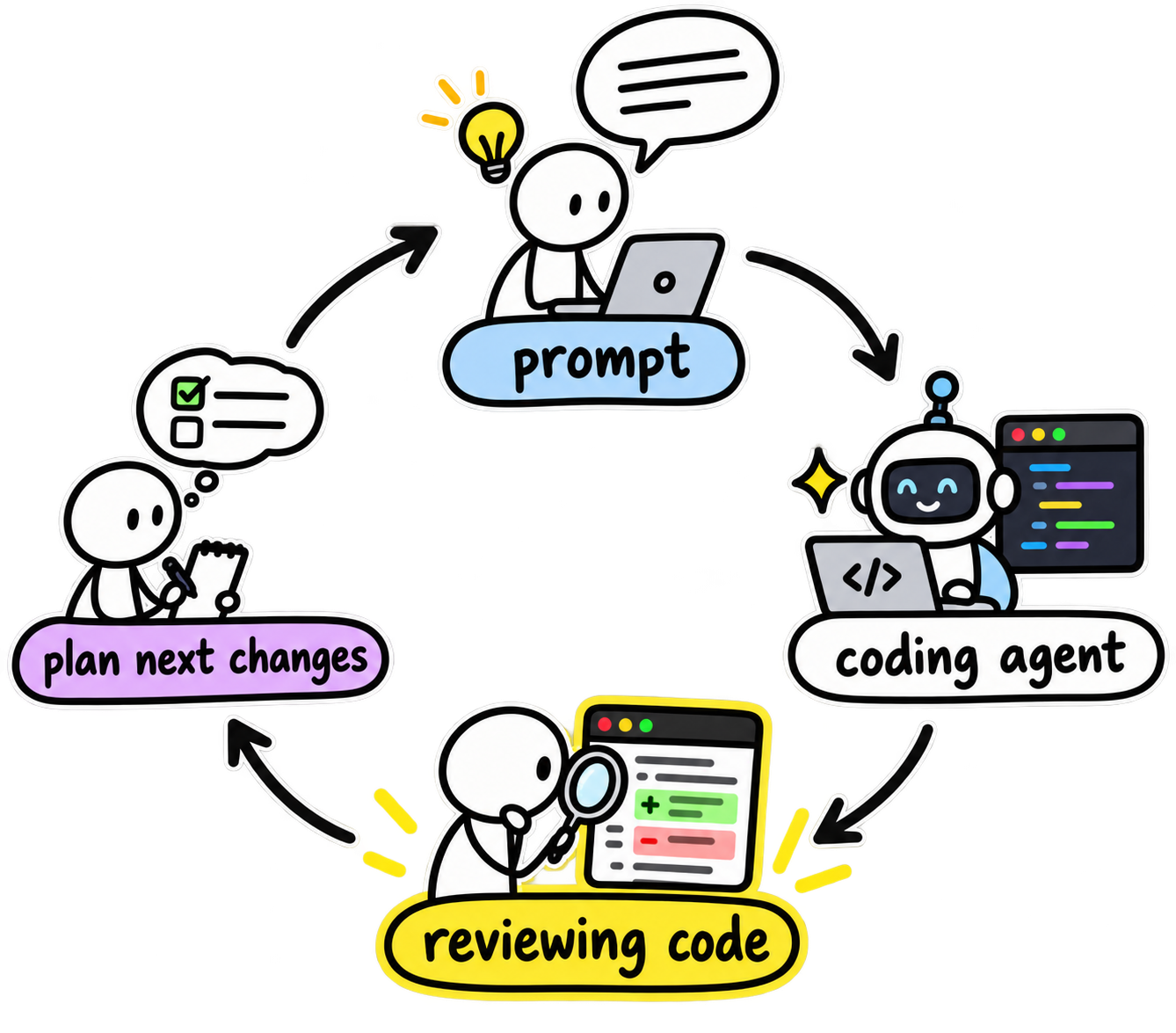
Reviewing code is the heavy part of this loop, and it is necessary. Agents are very good at writing code, but even a good prompt cannot eliminate judgment. The result still depends on what context the agent captured, which path it chose, and what it optimized for.
An agent can take the shortest route to a green test instead of the best route for the codebase. It can solve the ticket literally while missing the architecture around it. It can duplicate an abstraction, optimize its own loop, or confidently produce something that looks correct until somebody who knows the system actually reads it.
Models can review the work too. They should. Spawn a different model, use a different prompt, and let it search for what the writer missed. We do this at work all the time, and those reviewers often find real problems.
But the human is still there.
Today, I do not trust a fully autonomous chain to guarantee merge-ready code with no human review. Not yet. The human brings historical context, product judgment, taste, and - most importantly - responsibility for what ships.
The problem is not having a human in the loop. The problem is how expensive and disconnected that loop can feel.
That is why I created pi-coder.
Speeding Up the Loop
You are probably a software engineer. This post, and most of this blog, has a very specific audience: programmers.
And I am my favorite customer. I like building tools that make me better, especially tools that reduce the friction of keeping myself in the loop.
pi-coder provides two commands: /diff and /code. Let’s start with the biggest use case: reviewing a diff.
Run /diff, and you will see this:

In a few seconds, all the changes are right in front of you. You can see what happened, navigate the files, and focus on what needs your attention.
Press v to switch between side-by-side and line-by-line views. Use the arrow keys to move between files and around the diff. Simple. Then read what the agent actually did - not what it claimed it did ten minutes ago.
That distinction matters.
pi-coder has five panes, toggled directly from the keyboard:
1- files2- code3- comments4- pull request context (remote reviews only)5- pull request replies (remote reviews only)
Rendering a diff is not the interesting part. The interesting part is what happens when the review and the conversation with the agent live in the same workflow.
Discuss
See a line you do not understand? Press d, type your question, and ask the agent why that change exists:

A discussion is not a request to modify the code. It asks the agent to explain the change in prose while keeping the file untouched. You stay in review mode instead of turning every question into an edit.
Comment
Now suppose you do want a change. Press c and describe the correction:

A comment is actionable review feedback. It tells the agent that something should change and keeps that instruction attached to the relevant file and line.
The Prompt
Discussions and comments accumulate throughout the review. When you are ready, press s to submit them and open the prompt input. pi-coder turns everything you collected into a structured prompt that you can send back to the agent:
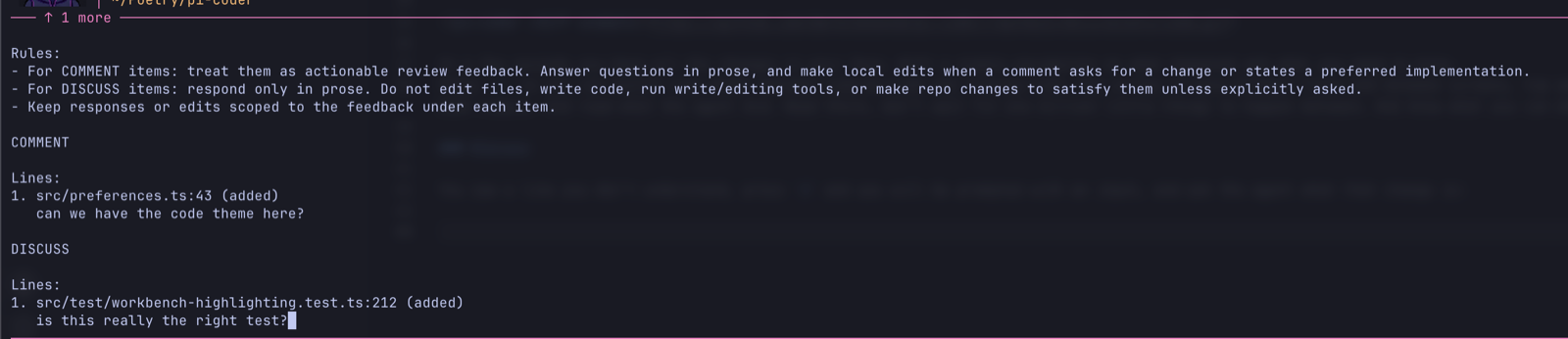
No manually copying filenames, line numbers, questions, and corrections into another prompt. The agent also has tools such as open_code and open_code_diff, so it can bring you back to the exact code or review when needed.
This does not remove the review. It removes the ceremony around it.
For me, that makes the loop feel 100 times faster.
Reviewing Code in the Wild
pi-coder also supports remote reviews. The API is deliberately simple:
/diff remote <url>
The workflow stays mostly the same, with a few additions:
- Comments can be posted to GitHub and other configured providers. GitHub is the default and requires the GitHub CLI (
gh) locally. - You can keep the agent in the loop when you need context or a second opinion.
- You can approve the pull request or request changes from the review.
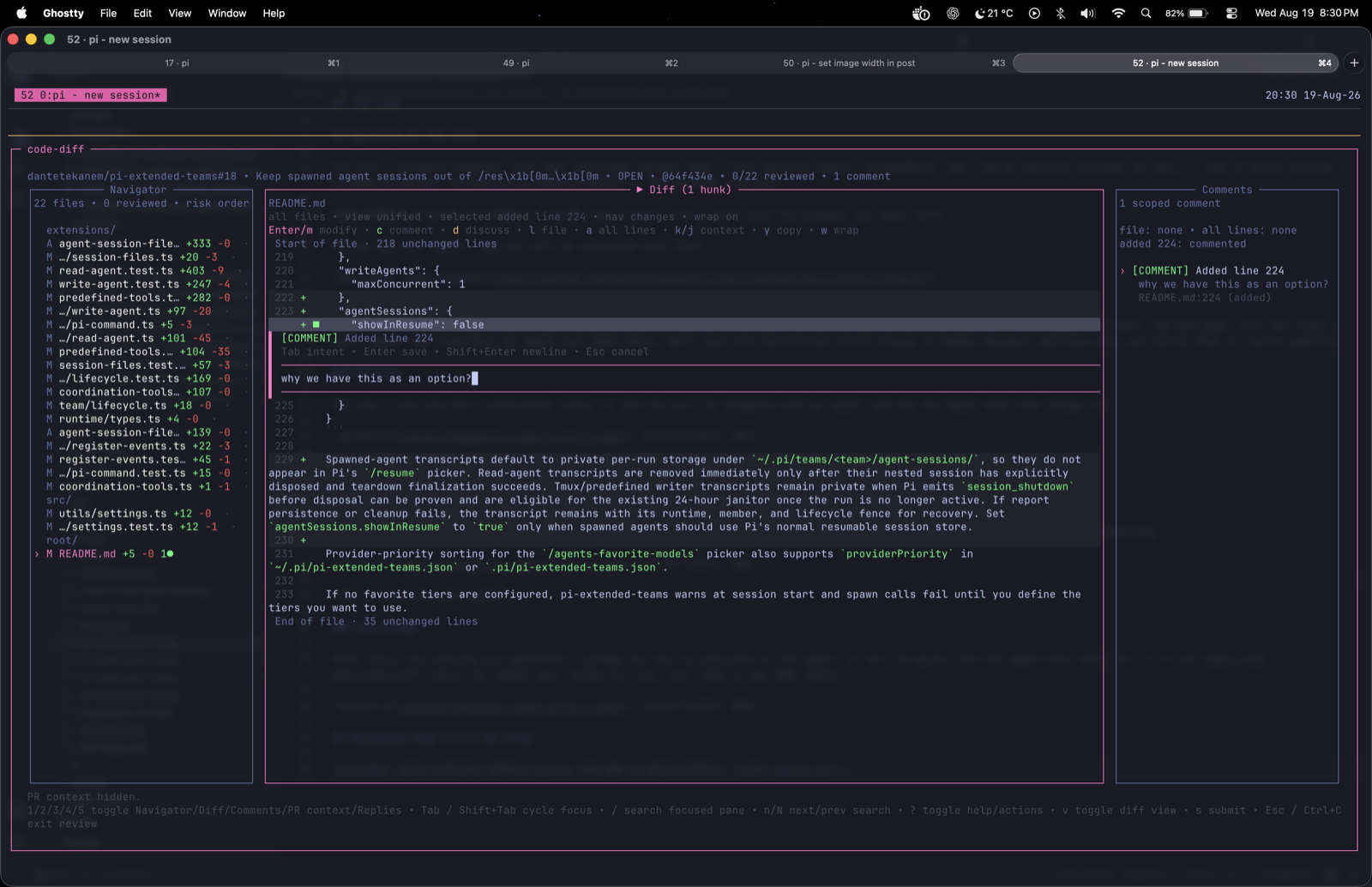
The changes to the workflow are small. The impact is not.
You already review code written by other people. What happens when you find a change you do not understand? Instead of leaving the review, copying a snippet, rebuilding the context in a separate chat, and eventually finding your way back, ask your local agent from the review itself.
That agent already has your skills, extensions, customized harness, and project context. The question stays scoped. The answer comes back where you need it. You stay in control.
Minimum Viable Code Editor (MVCE)
Another small need I kept finding in my day-to-day work was being able to see the whole codebase and navigate through it.
I am not well versed in every Neovim shortcut, so opening a tmux pane with nvim <folder>/ was not really working for me. Years of Visual Studio Code made my muscle memory work in a different way. But VS Code is not acceptable for this either. It is just too heavy.
I need something fast and light, with navigation that feels familiar. And I need the agent to open the exact code it wants me to see.
So pi-coder also includes /code:

Type /code and you will have it. From there, you can navigate the code, press d to discuss a file, ask questions, and make changes without breaking the loop. The agent can open it for you too, taking you directly to the code it wants to show you.
/code is not trying to replace a full editor. It was designed to cover a very small need - probably 1% of what an editor does - but it covers the right 1% for this workflow.
Turning the Loop Into Flow
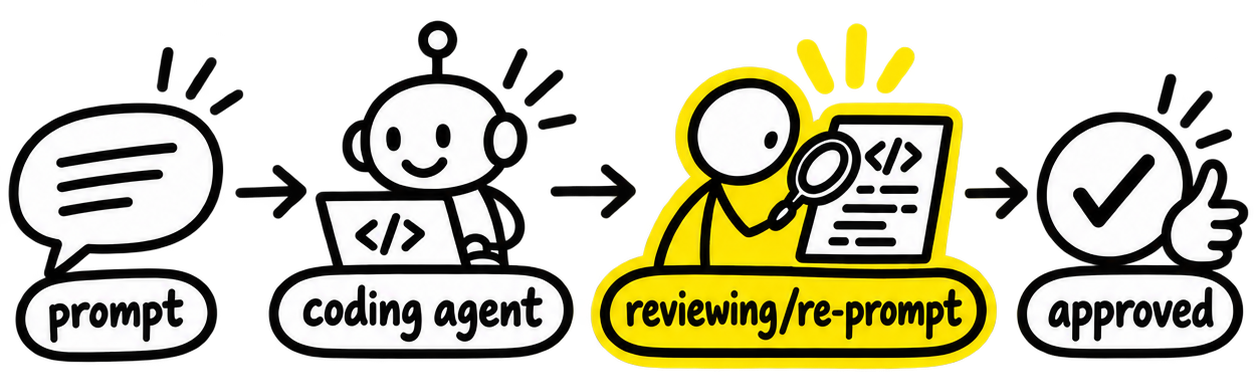
People often describe the human in the loop as a bottleneck. I think that is the wrong framing.
The human is not there to type a slower version of what the agent can produce. The human is there to provide judgment: to understand the system, question what does not make sense, reject the convenient wrong answer, and decide what is good enough to ship.
pi-coder does not remove that loop. It compresses it until reviewing, questioning, correcting, and finishing become one flow. It also gives you something people often overlook: a detailed understanding of the change.
Software engineering is not dead. It is changing. We are not being removed; we are adapting. Agents can generate more code, across more tasks, faster than ever. That makes engineering judgment much more valuable.
The agent can write the code. You still own what ships.
That’s All for Now
Pull requests, comments, and feedback are more than welcome on pi-coder. Let me know what you think about this flow and what you do differently in your own workflow.
As I said earlier, I will share more about how I use Pi day to day and how these agent loops work behind the scenes. You can reach me at me@leonardopereira.com.
Happy coding!
Ferramentas agênticas estão por toda parte. Em várias empresas, um único engenheiro agora consegue spawnar mais de 100 agentes em um dia normal. Pesquisa, código, automação, tarefas agendadas, reviews e muito mais.
Agentes conseguem fazer muita coisa, mas ainda não conseguem fazer tudo. Definitivamente não.
Quantos agentes você roda depende da tarefa. Uma investigação? Um modelo de fronteira provavelmente consegue lidar com ela sozinho se tiver o contexto de que precisa. A tarefa exige mais informações? Ele pode spawnar agentes para coletá-las em fontes diferentes. Uma implementação complexa pode usar vários agentes escritores atualizando partes independentes ao mesmo tempo. Uma orquestração maior pode ter um agente de fronteira delegando todo um grafo de trabalho.
O escopo pode crescer rápido. Manter o contexto sob controle é sempre importante.
Esse é o loop interno do agente, que vou explorar em outro post. Este aqui é sobre a parte que não podemos delegar: o humano no loop.
O Loop
Quando você usa agentes de código avançados com as checagens de permissão ignoradas, como Pi, Claude Code ou Codex, o fluxo muitas vezes parece simples: você fornece um prompt e espera o resultado.
Às vezes, é realmente assim tão simples. Então vamos imaginar uma tarefa empresarial real.
Você tem um monolito cujo produto principal é encurtar URLs. Ele existe há décadas e lida com tráfego sério. Um engenheiro recebe uma tarefa aparentemente pequena: rastrear um sinal adicional de telemetria para requests repetidas do mesmo endereço. Esse é o primeiro passo para introduzir orçamentos rígidos de requests e responder corretamente com 429 Too Many Requests.
Simples, certo?
A issue está bem escrita. Explica o problema, propõe uma solução e inclui critérios de aceitação. O sistema de telemetria já existe. Você aponta um agente de nível intermediário para o ticket e pede que implemente a mudança. Dez minutos depois, ele terminou. Testes escritos. Qualidade esperada entregue. Tudo verde, segundo o agente.
Seu ambiente local demora um pouco para rodar (afinal, é um monolito), e a infraestrutura do seu repositório de código poderia aguentar um pouco mais de pressão - não vou citar nomes e envergonhar ninguém - então você confia no resumo e envia a branch para review.
A CI começa. Vinte minutos depois, você recebe a notificação: tudo passou. Agora é hora da code review. Você não quer jogar porcaria de AI por cima do muro para os seus colegas, então primeiro inspeciona o trabalho.
E aí você encontra o problema.
O agente adicionou comentários inúteis que só repetem a issue. Pior: reimplementou o mecanismo de telemetria, mesmo que a base de código já tenha uma biblioteca exatamente para esse trabalho.
Terrível. Terrível.
Você volta ao agente de código, fornece seu feedback e espera mais uma rodada:
Revisar código é a parte pesada desse loop, e é necessário. Agentes são muito bons em escrever código, mas mesmo um bom prompt não consegue eliminar julgamento. O resultado ainda depende de qual contexto o agente capturou, de qual caminho escolheu e do que ele otimizou.
Um agente pode pegar o caminho mais curto até um teste verde em vez do melhor caminho para a base de código. Pode resolver o ticket literalmente enquanto deixa passar a arquitetura ao redor. Pode duplicar uma abstração, otimizar o próprio loop ou produzir com confiança algo que parece correto até alguém que conhece o sistema de fato ler.
Modelos também conseguem revisar o trabalho. Eles deveriam. Spawne um modelo diferente, use um prompt diferente e deixe que ele procure o que o escritor deixou passar. Fazemos isso no trabalho o tempo todo, e esses revisores frequentemente encontram problemas reais.
Mas o humano continua ali.
Hoje, eu não confio em uma cadeia completamente autônoma para garantir código pronto para merge sem review humana. Ainda não. O humano traz contexto histórico, julgamento de produto, bom gosto e - o mais importante - responsabilidade pelo que vai para produção.
O problema não é ter um humano no loop. O problema é o quanto esse loop pode parecer caro e desconectado.
Foi por isso que criei o pi-coder.
Acelerando o Loop
Você provavelmente é engenheiro de software. Este post, e a maior parte deste blog, tem um público muito específico: programadores.
E eu sou meu cliente favorito. Gosto de construir ferramentas que me deixam melhor, especialmente ferramentas que reduzem a fricção de me manter no loop.
pi-coder oferece dois comandos: /diff e /code. Vamos começar pelo maior caso de uso: revisar um diff.
Rode /diff e você verá isto:
Em poucos segundos, todas as mudanças estão bem na sua frente. Você consegue ver o que aconteceu, navegar pelos arquivos e focar no que precisa da sua atenção.
Aperte v para alternar entre as visualizações lado a lado e linha por linha. Use as setas para se mover entre arquivos e pelo diff. Simples. Então leia o que o agente realmente fez - não o que ele afirmou ter feito dez minutos atrás.
Essa distinção importa.
pi-coder tem cinco painéis, alternados diretamente pelo teclado:
1- arquivos2- código3- comentários4- contexto do pull request (apenas reviews remotas)5- respostas do pull request (apenas reviews remotas)
Renderizar um diff não é a parte interessante. A parte interessante é o que acontece quando a review e a conversa com o agente vivem no mesmo fluxo.
Discutir
Viu uma linha que você não entende? Aperte d, digite sua pergunta e pergunte ao agente por que aquela mudança existe:
Uma discussão não é um pedido para modificar o código. Ela pede que o agente explique a mudança em prosa, mantendo o arquivo intacto. Você continua em modo de review em vez de transformar cada pergunta em uma edição.
Comentar
Agora suponha que você quer mesmo uma mudança. Aperte c e descreva a correção:
Um comentário é feedback de review acionável. Ele diz ao agente que algo precisa mudar e mantém essa instrução anexada ao arquivo e à linha relevantes.
O Prompt
Discussões e comentários se acumulam durante a review. Quando estiver pronto, aperte s para enviá-los e abrir a entrada de prompt. O pi-coder transforma tudo que você reuniu em um prompt estruturado que pode mandar de volta ao agente:
Nada de copiar manualmente nomes de arquivos, números de linha, perguntas e correções para outro prompt. O agente também tem ferramentas como open_code e open_code_diff, para poder levar você de volta ao código ou à review exatos quando necessário.
Isso não remove a review. Remove a cerimônia em volta dela.
Para mim, isso faz o loop parecer 100 vezes mais rápido.
Revisando Código no Mundo Real
O pi-coder também suporta reviews remotas. A API é deliberadamente simples:
/diff remote <url>
O fluxo continua praticamente o mesmo, com alguns acréscimos:
- Comentários podem ser enviados ao GitHub e a outros provedores configurados. O GitHub é o padrão e exige a GitHub CLI (
gh) localmente. - Você pode manter o agente no loop quando precisar de contexto ou de uma segunda opinião.
- Você pode aprovar o pull request ou solicitar mudanças a partir da review.
As mudanças no fluxo são pequenas. O impacto não.
Você já revisa código escrito por outras pessoas. O que acontece quando encontra uma mudança que não entende? Em vez de sair da review, copiar um trecho, reconstruir o contexto em outro chat e eventualmente encontrar o caminho de volta, pergunte ao seu agente local a partir da própria review.
Esse agente já tem suas skills, extensões, harness customizado e contexto do projeto. A pergunta continua bem delimitada. A resposta chega onde você precisa dela. Você continua no controle.
Editor de Código Mínimo Viável (MVCE)
Outra pequena necessidade que eu continuava encontrando no trabalho do dia a dia era conseguir ver toda a base de código e navegar por ela.
Não domino todos os atalhos do Neovim, então abrir um painel do tmux com nvim <folder>/ não estava funcionando muito bem para mim. Anos de Visual Studio Code fizeram minha memória muscular funcionar de outro jeito. Mas o VS Code também não serve para isso. Ele é pesado demais.
Preciso de algo rápido e leve, com uma navegação que pareça familiar. E preciso que o agente abra o código exato que quer que eu veja.
Então o pi-coder também inclui /code:
Digite /code e está lá. A partir daí, você pode navegar pelo código, apertar d para discutir um arquivo, fazer perguntas e mudanças sem quebrar o loop. O agente também pode abrir tudo para você, levando você diretamente ao código que quer mostrar.
/code não está tentando substituir um editor completo. Foi projetado para cobrir uma necessidade bem pequena - provavelmente 1% do que um editor faz - mas cobre o 1% certo para esse fluxo.
Transformando o Loop em Fluxo
As pessoas frequentemente descrevem o humano no loop como um gargalo. Acho que esse é o enquadramento errado.
O humano não está ali para digitar uma versão mais lenta do que o agente consegue produzir. O humano está ali para exercer julgamento: entender o sistema, questionar o que não faz sentido, rejeitar a resposta conveniente e errada, e decidir o que está bom o suficiente para ir para produção.
O pi-coder não remove esse loop. Ele o comprime até que revisar, questionar, corrigir e finalizar virem um único fluxo. Ele também oferece algo que as pessoas frequentemente deixam de lado: uma compreensão detalhada da mudança.
A engenharia de software não morreu. Ela está mudando. Não estamos sendo removidos; estamos nos adaptando. Agentes conseguem gerar mais código, em mais tarefas, mais rápido do que nunca. Isso torna o julgamento de engenharia muito mais valioso.
O agente pode escrever o código. Você ainda é dono do que vai para produção.
É Isso por Enquanto
Pull requests, comentários e feedback são mais que bem-vindos no pi-coder. Me diga o que você acha desse fluxo e o que faz diferente no seu próprio workflow.
Como falei antes, vou compartilhar mais sobre como uso o Pi no dia a dia e como esses loops de agentes funcionam nos bastidores. Você pode falar comigo em me@leonardopereira.com.
Bom código!